
What Is an Accident Management System, and How Do You Set One Up?
An accident management system is the process and platform a workplace uses to log, track, and resolve every accident, injury, and near-miss, from the moment it's reported to the moment it's fully closed out.
Behind every report is a person
Setting one up isn't just a compliance exercise. Someone paused what they were doing, noticed something wasn't right, and told us. If a report disappears into a spreadsheet, gets lost in an email thread, or never gets a follow-up, we don't just lose visibility. We lose that person's willingness to come forward next time.
A system that protects that trust
Done well, an accident management system isn't just a list of open tickets sitting in a queue. It's how a safety team shows, in real time, that every voice raised is being heard, held, and acted on. Here's what to put in place, and in what order, to build one that actually holds up.
Step 1
Start With the Core Elements a Real System Tracks
A system that only shows ticket counts tells you volume, not care. The accident management systems that genuinely support a safety team, and the people who rely on it, tend to be built around six things. Tap one to see what it covers.
What's been reported right now, visible as it comes in, so no one wonders whether their report landed somewhere or vanished.
Not every incident needs the same response, and a system should make it immediately clear which ones need someone's attention right away.
How long has this report gone without a response? A stalled incident isn't just a process gap, it's a person still waiting to hear back.
Every open incident should have someone's name on it. If it's unassigned, the system should say so plainly, because a report with no owner is a promise not yet kept.
Is this a one-off, or has this happened before? Noticing the pattern is part of taking someone's concern seriously.
A frontline supervisor and a compliance lead need to see different things from the same reports, in a way that makes sense for how they each support people.
Step 2
Build the Accident Register
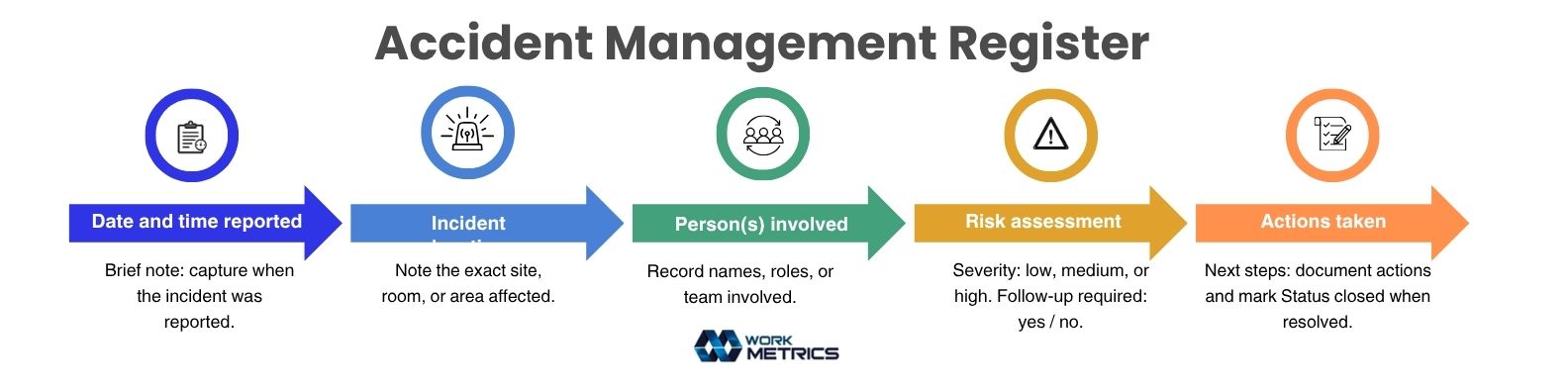
Every closed accident becomes part of something larger: a record of what a workplace has actually been through. The accident register is that record, the full, ongoing history of every incident, near-miss, and injury, kept in one place instead of scattered across old emails and paper forms in a drawer somewhere.
A well-kept register does more than satisfy an audit. It's how a safety team can answer questions that only become visible over time. Has this piece of equipment been involved in more than one incident? Is this the second fall on the same stretch of floor this year? Is a particular shift, site, or role showing up more often than it should? None of that is visible from a single report. It only becomes visible when every report lives somewhere permanent, searchable, and trusted to still be there months or years later.
Step 3
Define What Closing an Accident Out Actually Means
An open accident isn't finished when the immediate danger passes. It's finished when the person who reported it knows what happened next, what changed because of it, and that it's truly closed, not just quiet. A good accident management system makes closure visible, not assumed.
Not a ticket that just stops getting touched. Every accident ends with a status that says, plainly, that it's closed.
Whether that's a repair, a retraining, a policy change, or a conversation that needed to happen, the action is documented alongside the accident.
Even if the answer is simply "here's what we found, and here's what we did about it." A report that closes quietly teaches people that speaking up leads nowhere. A report that closes with a clear answer teaches them the opposite.
Step 4
Plan for It to Hold Up as You Grow
An accident management system that works when there are five reports a week doesn't automatically hold up at fifty. As a team grows, it gets easier for a report to quietly slip through, not because anyone stopped caring, but because there's more happening and less room to catch everything by memory.
This is where the elements from Step 1 stop being nice-to-haves and start being what keeps trust intact. Severity classification is what keeps an urgent concern from waiting behind a minor one. Time-in-stage tracking is what catches the report that's gone quiet for three days before someone starts to wonder if speaking up even mattered.
Step 5
Let It Evolve From Reactive to Predictive
The first version of most accident management systems simply reflects what's happening right now. That matters, but it's a starting point, not the destination.
Safety teams that lean into their system start to notice things a spreadsheet never would have shown them. A shift where concerns quietly spike. A type of incident that keeps taking too long to close. A team that speaks up often, and one that's gone unusually quiet, which is sometimes the more important signal. Over time, the system becomes less of a status board and more of a way to understand how safe people actually feel telling us the truth.
Start setting up your Accident Management System
Give every report a clear owner, a visible status, and a closed loop back to the person who raised it.